I Stopped Managing WooCommerce Orders Through the Admin UI
Using the WooCommerce API, custom scripts, and OpenClaw to run daily store operations through natural language.
Choosing WooCommerce at the beginning was a pragmatic decision.
When the website was still in the validation stage, we did not need a fully custom ecommerce system. What we needed was a way to quickly connect products, cart, payments, shipping, and order management so that the whole transaction flow could actually run. WooCommerce, built on top of WordPress, already provides mature product and order capabilities, and its plugin ecosystem can support payment, logistics, and many other ecommerce scenarios. For early-stage validation, it was a fast way to get the business flow running.
But once the website started operating with real orders, we gradually ran into another problem: WooCommerce is great for quickly building ecommerce capabilities, but its admin interface is not necessarily ideal for daily operations staff to use all day.
The Admin Interface Is Complete, but Not Always Aligned With Operational Workflows
The WooCommerce admin interface provides many features. Looking up orders, checking payment status, reviewing shipping information, and updating orders can all be done there.
But in day-to-day operations, the questions people ask are often not that standardized.
For example:
- Find orders that use a specific ECPay convenience store pickup method
- Find orders with a specific payment method
- Use a logistics tracking number to identify the corresponding order
- Check which customers recently purchased a specific product
- List orders requested for delivery tomorrow
- Prepare today’s shipping list
- Find paid orders that have not yet been processed for shipping
Most of these answers already exist somewhere inside WooCommerce, but they are not always easy to retrieve directly through the admin interface.
This becomes especially noticeable when payment and logistics are handled through plugins. A lot of information may be stored in order meta or in fields managed by those plugins. For engineers, the data can be traced. But daily operations staff should not need to know which meta key stores a logistics number, nor should they have to click through multiple admin pages just to find one order.
The original workflow often looked like this:
The Plugin Ecosystem Is Powerful, but We Were Not Familiar Enough With It
WooCommerce has a strong plugin ecosystem. That was one of the reasons we chose it in the first place.
But having many plugins also means there is a cost to choosing the right ones. At the time, we were not familiar enough with the WooCommerce plugin ecosystem. When we encountered very specific operational needs, we did not always know which plugin could solve them, or whether an existing plugin would fit our workflow exactly.
For example, we integrated an ECPay payment and logistics plugin. The plugin already handled many important parts of the transaction flow, such as payments, logistics, convenience store pickup, shipping numbers, and shipping label printing. These features were valuable and saved us a lot of development effort.
But daily operations often require more detailed queries and summaries.
An operations person may not simply want to “view an order.” They may want to ask:
Which order does this logistics number belong to? |
Or:
List the orders that need to be shipped tomorrow and use convenience store pickup. |
Or:
Show me recent orders for product 4182. |
These questions are very close to the language used in daily work, but they are not always directly supported by the WooCommerce admin interface. Even if some plugins support part of the display or workflow, they may not match exactly how we need to search, combine, and summarize information.
So we started asking ourselves: if the data is already in WooCommerce, can we stop forcing operations staff to understand admin fields and plugin data structures?
Treating WooCommerce as the Core Data System, Not the Only Interface
Eventually, we changed how we thought about WooCommerce. Instead of treating the WooCommerce admin as the only operational entry point, we started treating WooCommerce as the core transaction and data system.
WooCommerce still owns the products, orders, payments, and logistics data. But the daily queries and operational workflows we frequently use are handled by custom skills and scripts that access the data through the WooCommerce API.
The new workflow looks like this:
With this setup, operations staff do not need to know which WooCommerce field stores the data, or how the payment and logistics plugin structures its internal information. They only need to describe what they want to look up in natural language.
For example:
Find out which order this logistics number belongs to. |
Behind the scenes, the system checks WooCommerce order data and related meta data, finds the matching order, and returns a structured result.
Or:
List the orders requested for delivery tomorrow. |
The system uses the fields and rules we defined, then returns a list that operations staff can act on directly.
Natural Language Is Only the Entry Point. The Real Value Is Tool Encapsulation
The most important point here is that natural language itself is not magic.
What makes this workflow reliable is that we broke daily operational tasks into clear, repeatable, and controlled tools.
Take find an order by logistics number as an example. For operations staff, this is just one sentence. But for the system, it involves several steps:
- Receive the logistics number
- Call the
WooCommerce APIto retrieve order data - Scan the relevant
order meta - Match against
ECPaylogistics data - Identify the corresponding order
- Return the order number, payment method, shipping method, order status, and other necessary details
This design is much more reliable than letting an AI freely operate the admin interface.
The AI does not need to guess how to click through WooCommerce. It does not need to interpret plugin screens on the fly. It simply receives the user’s intent and calls the skills and scripts that we have already defined.
So the goal is not to “let AI maintain the store by itself.” The real goal is to turn repetitive admin lookups into tools that can be invoked through natural language.
How the Operational Experience Changed
After introducing this approach, the biggest change was not that the system suddenly felt “more AI.” The real change was that many small, repetitive operational tasks became much more direct.
Previously, an operations person might have to:
Log in to the WooCommerce admin |
Now they can ask:
List today's orders that need to be shipped, are already paid, and use convenience store pickup. |
The system returns a clean list directly.
The same pattern also works for quick lookups:
List the last three orders. |
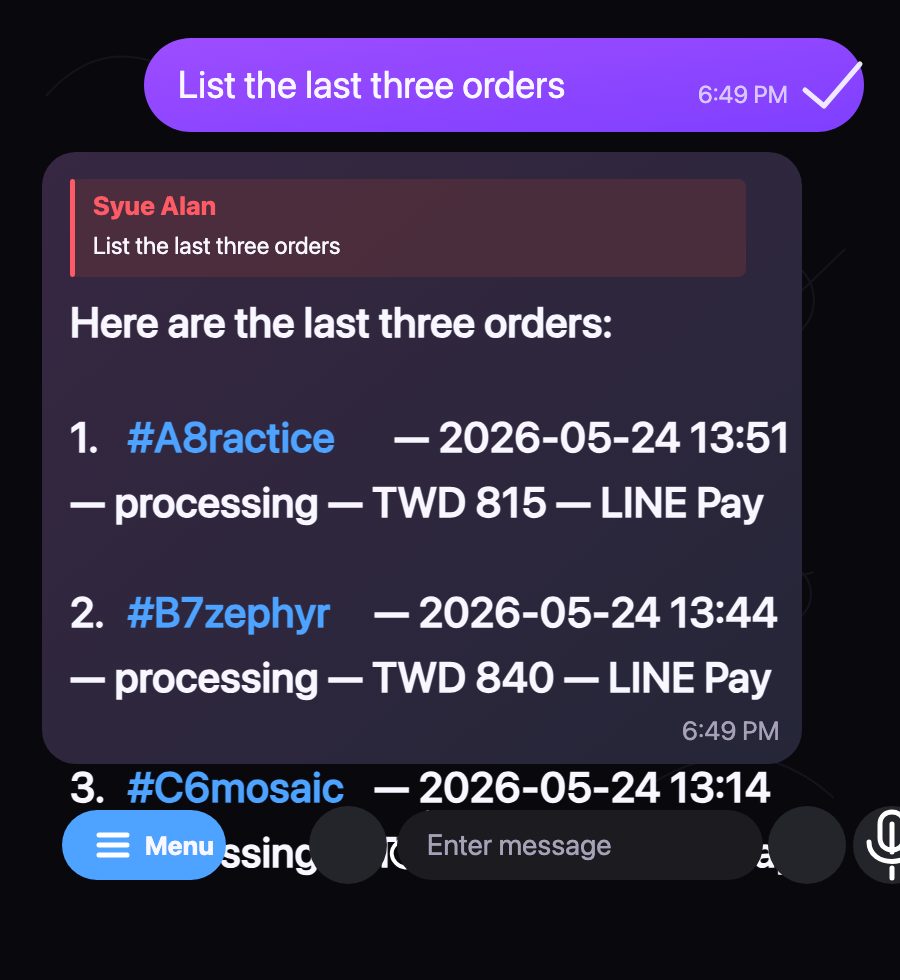
In this case, the response includes order IDs, timestamps, status, amount, and payment method without opening the WooCommerce admin.
This kind of improvement may not look flashy, but it matters a lot in daily operations. The exhausting part of operations is often not that any single task is difficult. It is the constant switching between small lookups, confirmations, comparisons, and manual summaries.
When these tasks can be triggered through natural language and executed reliably through API-based tools, operations staff can focus more on judgment and exception handling instead of constantly searching through the admin interface.
A Few Principles We Followed
When building this workflow, we kept a few boundaries in place.
First, read-only queries can be executed directly.
Looking up orders, products, logistics numbers, or shipping lists does not change system state, so these actions are relatively low-risk and suitable for direct natural language access.
Second, write operations should go through dry-run first.
Updating order status, regenerating logistics numbers, editing order notes, or processing orders in batches can affect real operations. For these actions, the system should first show what it is about to do and require human confirmation before executing.
Third, prompts are not a security boundary.
If an operation should not be allowed, it should be restricted at the tool layer. It is not enough to simply write “please do not do this” in a prompt. The reliable boundaries should be enforced through API permissions, script logic, and confirmation flows.
Fourth, results should be returned in language that operations staff can act on.
The API may return order IDs, payment methods, shipping methods, and meta keys. But what operations staff need to know is: can this order be shipped now, which logistics method is used, has it been paid, and does it require manual handling? The value of the tool is not just retrieving data, but transforming it into actionable information.
WooCommerce Is Still the Core, but It Does Not Have to Own Every Interface
This experience changed how I think about WooCommerce.
WooCommerce is very useful for quickly building ecommerce transaction capabilities. It is also a solid core system for product, order, payment, and logistics data. But once a website enters daily operations, not every workflow needs to be tied to the WooCommerce admin interface.
For us, a better model became:
transactions and data] --> B[WooCommerce API
stable access] B --> C[Scripts
operational logic] C --> D[Skills
executable capabilities] D --> E[OpenClaw
natural language entry point]
This lets us keep the advantages of WooCommerce, including its fast setup and plugin ecosystem, while adding an operational layer that better fits our daily work.
Conclusion
Building a fully custom ecommerce system from day one would have been costly, and it would not necessarily have matched our early validation needs. WooCommerce helped us get the transaction flow running quickly, and that was its biggest value.
But as operations became more complex, the part that needed improvement was often not the product page or the shopping cart. It was the admin workflow behind the scenes.
By using the WooCommerce API with custom skills and scripts, and by exposing those workflows through OpenClaw as a natural language interface, we were not trying to follow an AI trend. We were trying to make daily operations fit the way people actually work.
Operations staff should not need to understand which plugin stores data in which field just to look up an order. The system should understand the question, then retrieve the answer in a stable, controlled, and traceable way.
That is where I think API-first operations are most valuable: not replacing the original system, but adding a more practical operational interface on top of it.